
Patterns for Context Engineering in Agentic Applications
Architectural patterns for supplying and structuring context so production AI agents behave reliably at scale.

I remember the first time I watched our production AI agent hit a strange failure. Not a technical error, not a rate limit. The agent just forgot! In the middle of a customer conversation, it lost track of the customer’s original request and intent, started repeating itself, and eventually suggested something the customer had already ruled out three minutes earlier. When we analyzed it in detail, we found it was due to a confusing 47,000-token context window that had become a maze for the model to navigate.
If you’re building AI-based applications in 2026, you’ve probably hit this wall too. The conversation around AI development tends to focus on model selection, prompt engineering, and RAG architectures. But there’s a silent killer in production systems that nobody talks about enough: context engineering — or more specifically, the lack of it.
This isn’t about prompt optimization or prompt engineering. It’s about the fundamental architecture of how information flows through conversational AI systems. And it’s costing companies real money while degrading user experience in ways that are hard to diagnose but easy to feel.
The Token Explosion Nobody Saw Coming
When you build an agentic AI application: you start simple. A chatbot answers questions. Maybe it has access to a knowledge base. Then product asks for memory across sessions. Then you add tool use. Then multi-turn planning. Then error recovery. Then conversation history. Then rich context about the user.
Before you know it, every interaction is carrying the weight of everything that came before it, plus everything the system might need to know, plus every tool definition, plus safety instructions, plus output formatting rules. Your “simple chatbot” is now processing 15,000 tokens before the user even types their first message.
The mathematics are brutal. Let’s say you’re using Claude Sonnet 3.5 (not even 4.7!) at current API pricing:
- Input: $3 per million tokens
- Output: $15 per million tokens
A conversation that starts at 2,000 tokens and grows by 500 tokens per exchange doesn’t just add linearly. Each subsequent message inherits the entire conversation history. By the tenth exchange, you’re processing:
Message 1: 2,000 tokens
Message 2: 2,500 tokens (2,000 + 500)
Message 3: 3,000 tokens (2,500 + 500)
…
Message 10: 6,500 tokens
That’s not 5,000 tokens total. That’s ~45,000 tokens processed across ten exchanges — because each exchange processes everything that came before. The cost compounds like a snowball effect.
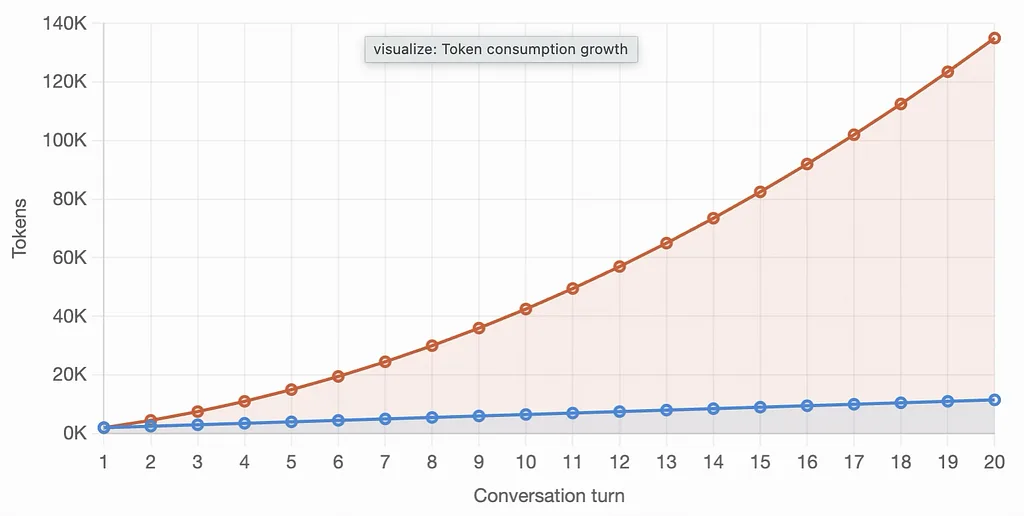 Token consumption compounds quadratically — roughly O(n2). The blue line shows tokens per inference growing linearly, but the orange line reveals the real story — cumulative tokens consumed across the conversation explode as context accumulates.
And this is conservative. Real production conversations look more like this:
- System prompt with safety rails: 3,000 tokens
- Tool definitions (8–12 tools): 4,000 tokens
- User context and memory: 1,500 tokens
- Conversation history (10 turns): 8,000 tokens
- Current user message: 200 tokens
You’re at 16,700 tokens before the model generates a single word of output. If that conversation runs for 20 turns? You’ve burned through 400,000 input tokens. At $3 per million, that’s $1.20 per conversation. Scale that to 10,000 daily conversations, and you’re looking at ~$12,000 per day — ~$360,000 per month — on context overhead alone.
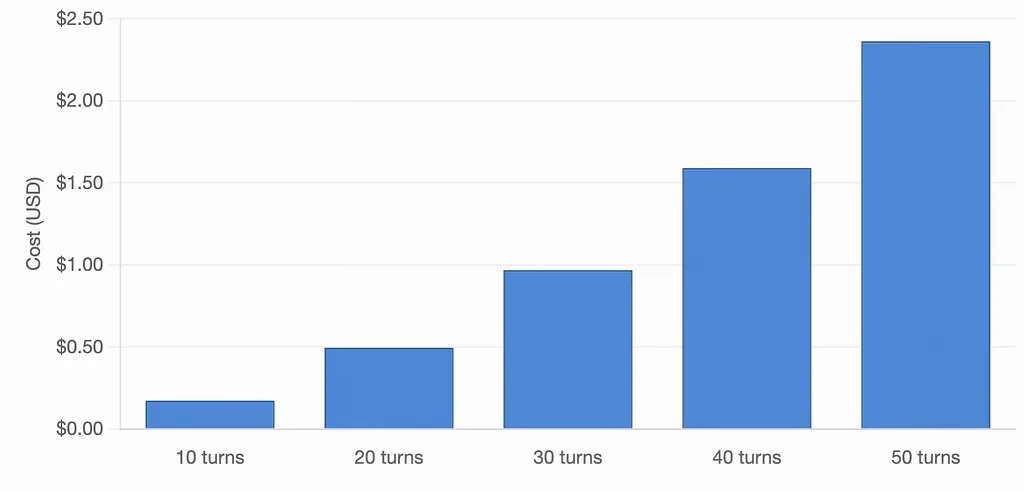 At 10,000 conversations/day with an average of 30 turns, you’re looking at $13,800/day or $414,000/month in token costs alone.
The Cost Curve
Token costs aren’t staying flat. While the headline story is “AI is getting cheaper,” the reality on the ground tells a different story. Yes, inference costs per token are dropping. But four factors are driving costs up:
1.Thinking models are the new default. With Claude Opus 4.7’s “xhigh” effort level, GPT-5.5’s reasoning mode, and Gemini 3.1 Pro’s deep thinking capabilities, reasoning models don’t just process tokens — they think in tokens. A Claude Opus 4.7 xhigh query that outputs 500 tokens might consume 25,000–50,000 thinking tokens internally. The user sees a thoughtful response. Your finance team sees a 50–80x token multiplier. Worse still, Claude Opus 4.7 shipped with Tokenizer 2.0, which produces up to 35% more tokens for identical input text compared to Opus 4.6. The headline price didn’t change ($5/$25 per million tokens), but your actual bill went up overnight. This is what AI FinOps teams call “silent inflation” — the tokenizer changed, the math changed, but the dashboard still shows the same per-token rate.
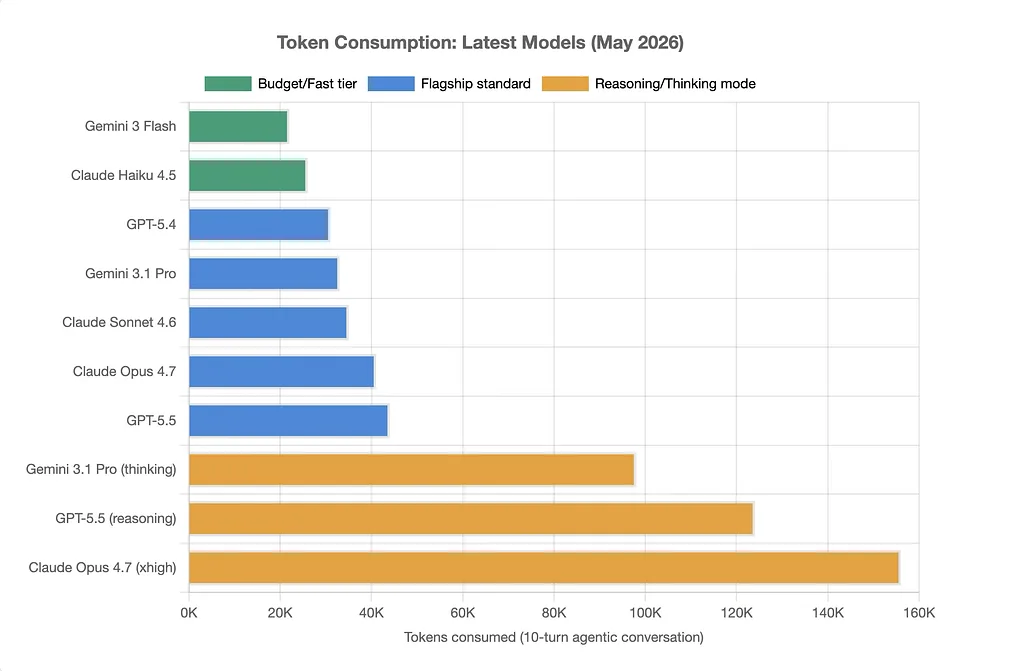 Token consumption across the latest May 2026 frontier models. Reasoning modes consume 3–4x more tokens than standard inference.
2. Agentic workflows multiply context. When your AI agent calls three tools, each tool call is a separate inference. Each inference gets the full context. A five-step agentic task with 10,000 tokens of context isn’t 10,000 tokens — it’s 50,000 tokens. The agent architecture itself becomes a token amplifier.
3. Multimodal contexts are massive. Adding vision? A single 1024x1024 image is ~1,500 tokens. Adding document understanding? A 10-page PDF is 8,000–12,000 tokens. Your “simple” customer support bot that can read uploaded receipts just 5x’d its token budget.
4. The quality-cost tradeoff is real. Cheaper models hallucinate more, which means more conversation turns to correct errors, which means more tokens. You save $0.10 per request on the model but spend $0.30 more on the extended conversation. The optimization that looks good in a spreadsheet fails in production.
When Context Becomes Chaos: Model Confusion is at Scale
Model degradation is another major issue with using a context window larger than optimal — and it’s more insidious because it’s harder to measure.
The technical term is “lost in the middle.” Anthropic, OpenAI, and Google have all published research showing the same pattern: when context windows get large, model accuracy on information in the middle sections drops significantly. The model is great at using information from the beginning (the system prompt) and the end (the most recent exchange). Everything in between? It’s there, technically, but the model struggles to retrieve it reliably.
In practice, this manifests as:
Repetition loops. The agent asks for information the user already provided six turns ago. You can see it right there in the context window. The model can’t.
Tool call hallucinations. The agent invents parameters for API calls instead of using values explicitly stated in the conversation. Why? Because that value is buried in turn 8 of a 15-turn conversation, and the model’s attention mechanism is degrading.
Instruction drift. Your carefully crafted system prompt gets overwhelmed by a large conversation history. The model starts following patterns from the conversation instead of following your instructions. Ever seen an AI agent suddenly change its tone, format, or behavior mid-conversation? That’s context overload.
Inconsistent reasoning. The agent arrives at different conclusions about the same information depending on where it appears in the context. Information at token 2,000 gets weighted differently than identical information at token 15,000.
How to fix it?
Here are some of the practical patterns to help fix the problems described above and make your agents and agentic workflows more effective and cost efficient.
Pattern 1: Context Compression — Making Every Token Count
The first pattern is deceptively simple: compress what you don’t need to preserve in full density.
Most conversation histories don’t need to be preserved verbatim. When a user asks “What’s the weather?” and the AI responds with a detailed forecast, you don’t need to keep all 200 tokens of that forecast in context for the next 15 turns. You need:
- The fact that weather was discussed
- The location (London)
- The date (today)
- Key takeaway (rainy, 15°C)
That’s 20 tokens, not 200.
Implementation approach:
After each exchange, run a background compression pass:
- Take the last completed exchange (user message + assistant response)
- Extract factual nuggets and decisions
- Store original exchange in external memory (database, vector store)
- Replace the full exchange with a compressed summary
Critical caveat: Don’t compress until the exchange is complete. Don’t compress the last 2–3 turns. Keep recent context fully detailed — that’s where the model’s attention is strongest anyway.
Pattern 2: Hierarchical Context — Information in Layers
Not all context is created equal. Your system prompt needs high fidelity. Tool definitions need precision. But that anecdote from turn 3 about the user’s preference for email over phone? That can live in a lower-fidelity layer.
Think of your context like a pyramid:
Layer 1: Core System (Always Present)
- System prompt and instructions
- Current user message
- Immediately preceding exchange
- Critical user context (identity, permissions, safety constraints)
Layer 2: Working Memory (Present When Relevant)
- Recent conversation history (last 5–7 turns)
- Active tools for current task
- Temporary state (shopping cart, form in progress)
Layer 3: Background Context (Loaded Dynamically)
- Older conversation history (summarized)
- Full tool catalog (loaded only when needed)
- Extended user history
- Domain knowledge
Essentially, you’re making explicit decisions about token budget allocation. Core gets 4,000 tokens. Working gets 6,000. Background gets whatever’s left — and only if it’s needed.
Pattern 3: Semantic Chunking — The Right Tool at the Right Time
Here’s a pattern I see teams get wrong constantly: loading every tool definition into every conversation.
If your AI agent has access to 20 tools, and each tool definition is 200 tokens, that’s 4,000 tokens of tool definitions. Present in every single inference. Even when the conversation is about checking account balance and 18 of those tools are for scheduling, data analysis, and customer support escalation.
Why? Because developers are terrified the model will need a tool and not have it available. But that’s not how agentic systems should work.
Implementation approach:
Build a two-phase tool system:
Phase 1: Intent Classification Use a fast, cheap model to classify what category of task the user wants:
- Information retrieval
- Transaction execution
- Data analysis
- Scheduling
- Support escalation
Phase 2: Targeted Tool Loading Load only the tools relevant to that category.
Token savings: 3,000+ per inference. Cost savings: ~18%.
Don’t just classify upfront. Re-evaluate after each tool call. If the agent used a transaction tool, load more transaction tools for the next inference. If it’s pulling information, load information tools. Let the tool set evolve dynamically based on what the agent is actually doing.
Pattern 4: Streaming State Machines — Context That Evolves
Traditional chatbots keep everything in context. Every conversation turn lives in the context window until something breaks. But human conversations don’t work like that. We maintain focus on the current topic and let old topics fade.
Implement conversations as state machines where context changes based on state:
State: Greeting → Load: welcome tools, basic user info
State: Intent Discovery → Load: classification tools, history summary
State: Task Execution → Load: task-specific tools, relevant data
State: Confirmation → Load: transaction tools, audit log
State: Closing → Load: feedback tools, minimal history
The conversation doesn’t carry 15 turns of greeting exchange into task execution. It carries a 50-token summary: “User greeted, authenticated as Alice (ID: 12345), wants to transfer $500.”
Pattern 5: External Memory Architecture — Context Outside the Window
Here’s a hard truth: not everything needs to be in the context window. In fact, most things shouldn’t be.
Your AI agent doesn’t need every historical conversation in context to function well. It needs:
- Current conversation
- Relevant past information when explicitly needed
- A mechanism to retrieve additional context on-demand
This is the external memory pattern. Store the full conversation history, user preferences, past decisions, and domain knowledge outside the context window. Use semantic search or structured retrieval to pull in only what’s needed for the current inference.
Architecture:
┌─────────────────┐
│  Context Window │
│  (8K tokens)    │
│                 │
│  - System       │
│  - Current turn │
│  - Recent (3)   │
│  - Retrieved    │
└────────┬────────┘
         │
         ↓ Query when needed
┌────────────────────┐
│  External Memory   │
│                    │
│  - Full history    │
│  - User profile    │
│  - Domain knowledge│
│  - Past decisions  │
└────────────────────┘
The beauty of this pattern: your context window stays lean (8,000 tokens) even for users with months of conversation history. Old information exists, but it’s not polluting every inference. You pay for retrieval only when needed — and retrieval from a vector database is orders of magnitude cheaper than including everything in every LLM call.
Pattern 6: Progressive Disclosure — Lazy Loading for Conversations
In web development, we learned not to load everything upfront. Load what you need, when you need it. The same principle applies to AI context.
Start conversations with minimal context. Add more only when the conversation signals it’s needed:
Minimal Start:
- System prompt: 2,000 tokens
- User identification: 100 tokens
- Current message: 200 tokens
- Total: 2,300 tokens
If conversation extends beyond 5 turns:
- Add compressed history: +500 tokens
If user references past interactions:
- Retrieve and inject relevant past context: +1,000 tokens
If task requires specialized tools:
- Load tool-specific context: +800 tokens
Each addition is triggered by a signal from the conversation itself. You’re not guessing what might be needed. You’re responding to what the model or user explicitly indicates they need.
The model itself becomes a signal for what context is needed. If it’s fumbling or asking for information, that’s your cue to load more context. If it’s handling the conversation smoothly, leave the context lean.
Pattern 7: Context Rotation — Fresh Windows for Long Conversations
For conversations that truly need to run for 50+ turns, implement context rotation. Think of it like memory paging in operating systems: you can’t keep everything in RAM, so you swap in and out.
Every 10–15 turns, create a checkpoint:
- Compress the last 10–15 turns into a summary
- Write the summary to external storage
- Clear the detailed history from context
- Keep only the compressed summary
Your context window resets, but the conversation doesn’t lose coherence because you’re preserving the essential information.
The result: conversations can run indefinitely without the context window exploding. You maintain coherence through compression, not through carrying everything forever.
Pattern 8: Differential Context — What Changed?
The most sophisticated pattern: only update the context with what changed.
Between turns, most of your context stays the same. System prompt: same. Tool definitions: same. User identity: same. The only things that change are:
- New user message
- New assistant response
- Potentially some state updates
Instead of sending the full context every time, send:
- A context ID (hash of the current context state)
- The delta (what changed since last call)
Token savings on subsequent calls: 95%+. But this requires the API to cache and reuse the base context — a feature that’s currently available in preview from Anthropic and OpenAI.
The AI FinOps Mindset: Measuring What Matters
None of these patterns matter if you’re not measuring their impact. Here’s what to track:
Per-conversation metrics:
- Total tokens consumed (input + output)
- Cost per conversation
- Number of turns to task completion
- Context window size over time
System-wide metrics:
- Daily/monthly token burn rate
- Cost per thousand conversations
- Average context size across all conversations
- Token efficiency ratio (useful tokens / total tokens)
Quality metrics:
- Task completion rate
- User satisfaction
- Model confusion events (repetition, inconsistency)
- Tool call accuracy
Build dashboards. Set alerts. When average context size starts creeping up, that’s a leading indicator that your context engineering is degrading. When cost per conversation increases without a corresponding increase in quality, something’s wrong with your architecture.
The teams doing this well treat context as a budget, not an infinite resource. They assign token budgets to different components:
- System prompt: 3,000 tokens (max)
- Tools: 2,000 tokens per category
- History: 5,000 tokens (compressed)
- User context: 1,000 tokens
- Current exchange: 3,000 tokens
Total budget: 14,000 tokens. Everything is designed to fit within that budget. If something wants to exceed it, something else has to give.
The Path Forward
Context engineering isn’t sexy. It’s not the headline feature. But it’s the difference between an AI application that scales profitably and one that eats your margin and degrades over time.
The patterns I’ve outlined here aren’t theoretical. They’re battle-tested approaches from production systems handling millions of conversations. And they’re necessary because the alternative — just throwing more context at the problem — doesn’t work. It gets more expensive and less reliable as you scale.
As thinking models become standard, as agentic workflows become more complex, as multimodal inputs become ubiquitous, context engineering moves from nice-to-have to mission-critical. The teams that figure this out early will have a massive advantage: better model performance at lower cost.
Start with Pattern 1 (compression) and Pattern 3 (semantic tool loading). Those give you the most immediate impact. Then layer in external memory and hierarchical context. Save differential context for when you’re operating at significant scale — it’s the most complex but offers the highest ceiling.
The future of AI applications isn’t just smarter models. It’s smarter architecture around those models. And that architecture starts with how you engineer context.
Please reach out to me on LinkedIn if you would like to discuss this topic further.