
A deep agent anatomy
The four components behind deep agents — a detailed system prompt, a planning tool, sub-agents and a file system — and how they differ from shallow ReAct agents.

Workflow that AI writes for itself
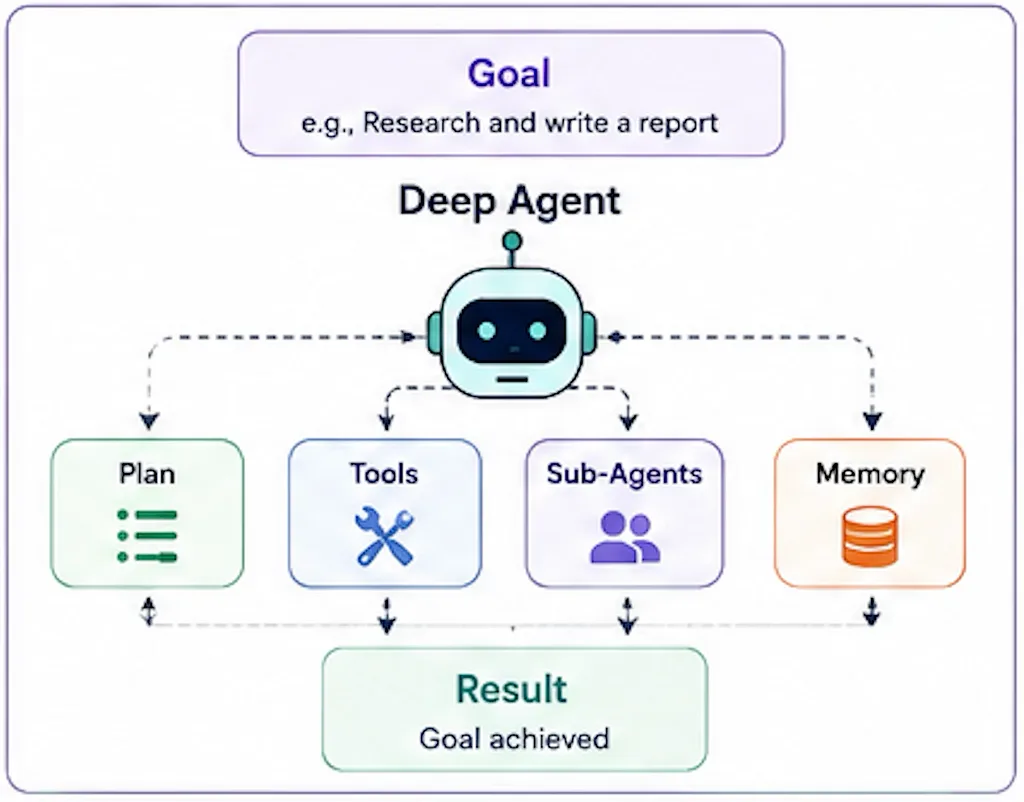
When you ask an AI agent to do a complex task, like researching a topic, generating a report, or migrating a piece of software, it doesn’t just perform a single action. Instead, it creates a series of steps or a workflow that it will follow to complete the task. This workflow is what we refer to as a “deep agent.”
Back in 2025, AI agents couldn’t do more than a single action at a time. They were like a single function call in a program because they lacked this crucial workflow capability. If you gave them complex tasks, they wander off track, get confused, or fail to complete the task.
If you have created workflows in software before, you know what is involved in building one: define steps, execution sequence, conditions, error handling, and so on. Only one thing is different here: the AI is generating this workflow for itself, based on its understanding of the task and its capabilities. It is not a design-time flowthat you “hardcoded”; it is dynamic and can adapt as the LLM learns more about the task or encounters new information or changes in the environment.
So, deep agents solve both of these problems — stay on track by doing multi-step workflows and adapt to new information or changes in the environment. They are a powerful tool for enabling AI to handle complex tasks that require planning, decision-making, and adaptability.
(Shallow) Agent
# A "shallow" agent: an LLM calling tools in a loop.
while not done:
    step = llm(messages, tools)        # think
    if step.tool_call:
        result = run(step.tool_call)   # act
        messages += [step, result]     # ...and the result piles up in context
    else:
        done, answer = True, step.text
This is the ReAct pattern, and for most jobsit’s all you need: a question, a lookup, a single tool call. It’s all good.
Deep Agent
from langchain.chat_models import init_chat_model
from deepagents import create_deep_agent

model = init_chat_model("...")   # any tool-calling model: Claude, GPT, Gemini, open-weight

agent = create_deep_agent(
    model=model,
    tools=[search, fetch_url],         # your tools
    system_prompt=RESEARCH_INSTRUCTIONS,  # the "operating manual"
)
# planning (write_todos), a virtual file system, and sub-agents are built in
result = agent.invoke({"messages": "Brief me on the main players in the EV charging market"})
A deep agent keeps the loop but wraps structure around it. That structure is the important part, worth diving deep into.
History
Harrison Chase at LangChain coined the term “deep agent” in 2025. He noticed something common in how ChatGPT, Claude, and other LLMs were trying to accomplish complex tasks. They essentially had four things in common: a detailed system prompt, a planning tool, sub-agents, and a file system. He bundled these four things together and called it a “deep agent”.
It’s important to highlight that this is an architectural construct — you can adopt it with a well-known framework like LangChain, LlamaIndex, or AutoGPT. You can also build your own deep agent from scratch if you’d like to.
Comparison with Traditional Orchestration Workflows
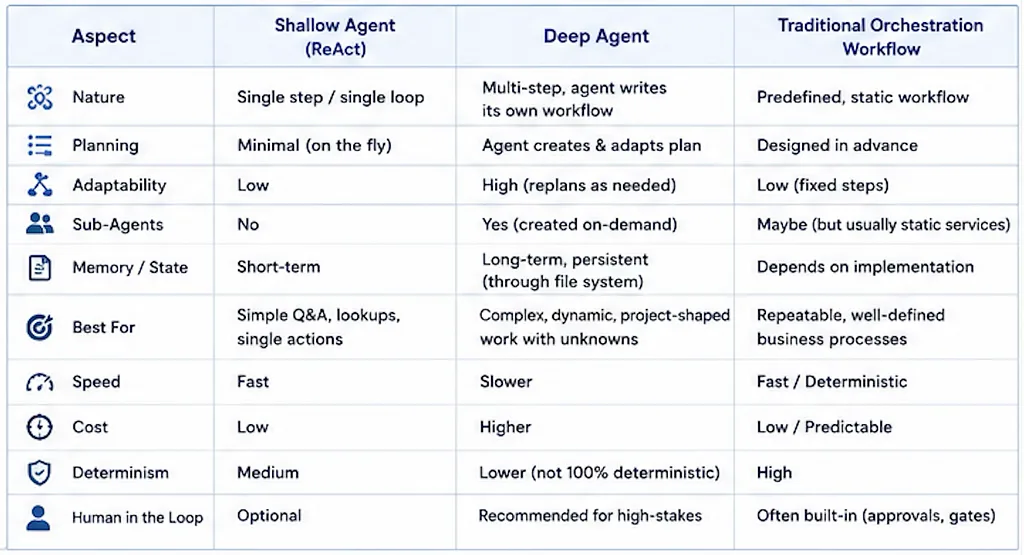
Four Components of a Deep Agent:
- Detailed System Prompt: A shallow prompt (agent) receives a single instruction or a question like “What is the weather today?” and responds with a single answer. A deep agent gets almost like a training manual — as a prompt describing — how it works, what good looks like, examples of good and bad, and what to do when it gets stuck. This is the “system prompt” that guides the agent’s behavior. Key point here is to describe “how” to do the task, not “what” to do.
- Planning Tool: This is the most crucial part of the deep agent. Just like humans maintain a mental model of the task at hand, a deep agent uses a planning tool to break down the task into smaller, manageable steps. It works purely because laying the steps out keeps the agent on track over a long task. This is the agent drawing its own DAG, one step at a time. An agent that writes “1. outline the sections, 2. research each one, 3. draft, 4. fact-check, 5. tighten” and then works down the list doesn’t lose the thread halfway through.
- Sub-Agents: The orchestrator spawns sub-agents to handle those specific tasks in its workflow. They are created on-demand and focused on doing one specific task very well. This also helps the deep agent stay organized and efficient, as it can delegate tasks to specialized sub-agents rather than trying to handle everything itself.
- File System: A deep agent needs a way to store and retrieve information as it works through its tasks. This could be a simple in-memory structure, a database, or even a file system. The key is that the agent can keep track of what it has done, what it needs to do next, and any relevant data it has gathered along the way.
When to use it and when not to
The key word here is “determinism”. If your task at hand is well defined, with well known steps at design time and expected outcomes, doesn’t need replanning on the way, shallow agent is good enough. In fact, go for traditional orchestration workflows. Deep agents are best suited for tasks that are complex, dynamic, and require adaptability. The cost is that they are slow, expensive, and don’t always produce100% deterministic results.
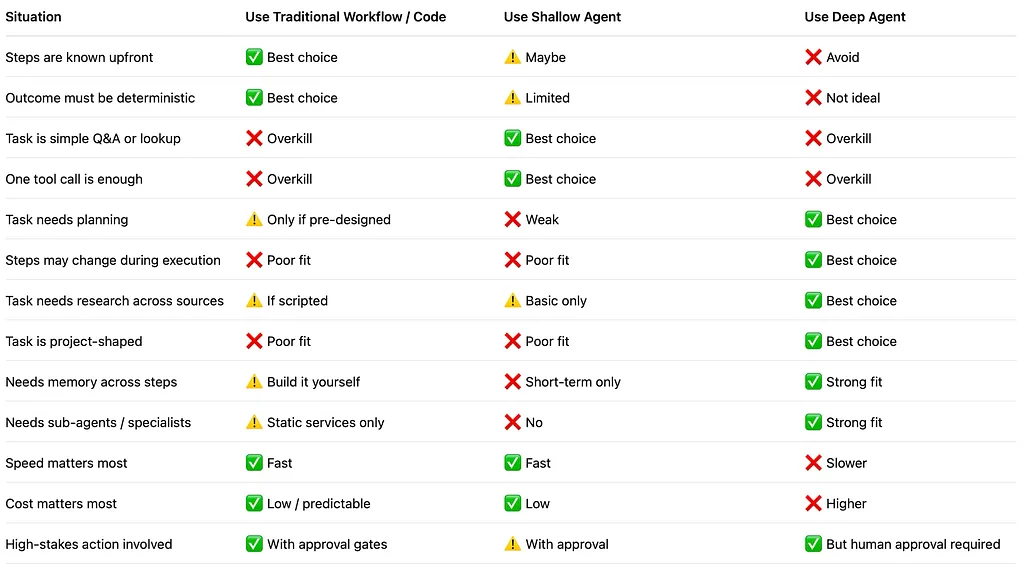
Use deep agent when the work is genuinely project-shaped and you can’t pre-script it: researching and writing something from many sources, refactoring a large codebase, working through a long document to produce something structured, planning anything with a lot of moving parts that shift as you go. If the steps are knowable and fixed, you don’t want a deep agent at all. Use a normal workflow, or just code. It’ll be cheaper, faster, and you can actually test it.
Another architectural consideration is the human in the loop:
Use a deep agent to do the legwork underneath a decision or an action. Don’t let it take the high-stakes, irreversible step on its own.
Sending the email, deploying to production, spending real money, making a call someone is accountable for: that’s where a human goes in the loop. The agent gets you to the edge of the decision. A person makes it.
Avoid the following things in deep agents
We have so many frameworks and libraries that make it easy to build deep agents, but there are some pitfalls to avoid:
- Overcomplicating the Workflow: While deep agents are designed to handle complex tasks, it’s important not to overcomplicate the workflow. Keep it as simple and clear as possible to avoid confusion and inefficiency.
- Ignoring Error Handling: Make sure to include robust error handling in your deep agent’s workflow. This will help the agent recover from unexpected issues and continue working towards its goal.
- Neglecting Performance: Deep agents can be resource-intensive, so it’s important to monitor their performance and optimize where possible. This may involve refining the workflow, improving the planning tool, or optimizing sub-agent performance.
- Lack of Testing: Just like any software, deep agents should be thoroughly tested to ensure they perform as expected. This includes testing the workflow, sub-agents, and error handling mechanisms.
- Not Updating the System Prompt: As the task evolves or new information becomes available, it’s important to update the system prompt to reflect these changes. This ensures that the deep agent remains effective and relevant in its decision-making process.
- Over-reliance on Sub-Agents: While sub-agents can be useful for handling specific tasks, it’s important not to over-rely on them. Ensure that the main deep agent retains control and oversight of the overall workflow to maintain coherence and direction.
- Managing Cost: Deep agents can be expensive to run, especially if they require significant computational resources. Be mindful of the costs associated with running deep agents and consider ways to optimize their performance and resource usage.
- Ignoring Human Oversight: While deep agents can handle complex tasks, it’s important to maintain human oversight, especially for high-stakes decisions. Ensure that there is a clear process for human intervention when necessary.
- Failing to Document the Workflow: Proper documentation of the deep agent’s workflow is essential for understanding its operation and for future maintenance. Ensure that the workflow, decision points, and error handling procedures are well-documented.
- Not Considering Ethical Implications: When designing and deploying deep agents, consider the ethical implications of their actions and decisions. Ensure that the agent’s behavior aligns with ethical standards and societal norms.
- Observability: Implement observability into your deep agent to monitor its performance, track its decisions, and understand its behavior. This can help identify issues early and improve the overall effectiveness of the agent.
Conclusion
If you are using ChatGPT, Claude, GitHub Copilot, or Cursor to do complex tasks, you are already using a deep agent. The key is to understand the architecture and how to leverage it effectively. By following best practices and avoiding common pitfalls, you can build powerful deep agents that can handle complex tasks with adaptability and efficiency.
In my experience, using deep agents along with traditional orchestration workflows and human oversight can lead to more deterministic and reliable outcomes. Next in the series is how to mix deep agents with traditional orchestration workflows to get the best of both worlds.
Resources
Working examples of shallow and deep agents: https://github.com/shahravir/deep-agent-anatomy